Creating streaming pipelines with Delta Live Tables
This documentation will guide you on how to create streamimng tables, views and flows in Databricks workspaces using Delta Live Tables through BlipDataForge library.
A Delta Live Table (DLT) consists of a delta table that is written by some streaming process, called DLT Pipeline. In Databricks, DLT is the official way of declaring streaming tables, since it simplifies checkpoint management and resilience.
If you want just to ingest data from an Azure EventHub, or want to declare more complex streaming flow of transformations, this article is for you.
TL;DR
To create a streaming flow using DLT, you must:
- Request the creation of a DLT Pipeline using the D&A - Contact Form;
- Import
DataPlatformclass, instantiate it and callget_streaming_enginefunction to set up the streaming engine - Import the data source class from
blipdataforge.streaming.sourcesaccording to where you data comes from, i.e. an EvenHub or other streaming/static delta table; - If necessary, define the transformations which will be applied to the income data before being persisted into the table;
- Declare your table, view or append flow by using the streaming engine;
- Validate and run you pipeline.
Setting up the workflow
First, it is necessary to create the Delta Live Table pipeline in Databricks. Since this step needs some technical expertise, which is the scope of the Admin and Ops team, such as cluster policy, cluster size and product edition, you must request the creation of the pipeline using the D&A - Contact form. Select the Others option in the form and describe that you need the creation of a Delta Live Table Pipeline, pointing why you want it, what purpose it serves and if it's a continuous or triggered pipeline. Learn more about triggered and continuos pipeline in Triggered vs. continuous pipeline mode article.
In a similiar way to creation of Azure Data Factory pipelines, some tags must be informed to keep track of costs. The necessary tags are described in this article, and Admin and Ops team will contact you to gather this information.
Creating Tables and Views
Once your pipeline is created, it's time to define your tables and views. To do so, import the DataPlatform class, instantiate it and create a streaming engine by calling the get_streaming_engine function. This streaming engine object has the functions to manipulate streaming objects.
The code below shows the creation of a streaming table that reads the data from the clients_trustedzone.some_database.test_table table and writes to a streaming table called streaming_table_01 in the catalog of your current workspace. Furthermore, a streaming view called streaming_view_01 is declared pointing to the streaming_table_01, without transformations.
from blipdataforge import DataPlatform
from blipdataforge.streaming.sources import TableSource, StreamingTableSource

dp = DataPlatform()
streaming = dp.get_streaming_engine()

streaming.table(
    name="streaming_table_01",
    comment="A streaming table from a DLT pipeline using BlipDataForge.",
    data_source=TableSource(
        catalog="clients_trustedzone",
        database="some_database",
        name="test_table"
    ),
    temporary=False,
    partition_cols=["column_01", "column_02"],
    transformations=[]
)

streaming.view(
    name="streaming_view_01",
    comment="A temporary view with data from streaming_table_01.",
    data_source=StreamingTableSource(
        name="streaming_table_01"
    ),
    transformations=[]
)
table function are self explanatory, like name, comment and partition_cols, but data_source, temporary and transformations need some attention as follows.
data_source
This parameter defines where the data comes from. The available data sources are defined in blipdataforge.streaming.sources module. Each data source has its own signature, so read the documentation of the desired data source to understand how to use it.
temporary
Create a table, but do not publish metadata for the table. The temporary keyword instructs Delta Live Tables to create a table that is available to the pipeline but should not be accessed outside the pipeline. To reduce processing time, a temporary table persists for the lifetime of the pipeline that creates it, and not just a single update.
transformations
Transformations are methods that receive at least a dataframe and returns a transformed dataframe. The minimal signature of a transformation looks like def my_transformation(df: DataFrame) -> DataFrame:
This parameter accepts a list of method names that will be called to transform the income data before it is saved into the Data Lake. Alternatively, this list can contain objects of Tuple type containing the method name, *args and **kwargs to be passed during the transformation.
For beter understanding, the following code shows how a transfomation can be passed to a table declaration.
from pyspark.sql.dataframe import DataFrame
from pyspark.sql.functions import col, lit

# Define the functions that will be passed as transformations. Note that all functions must accept a DataFrame as input and return a DataFrame.
def multiply_column_by_two(df: DataFrame) -> DataFrame:
    """Adds a column containing the value of an existing column multiplied by 2."""
    return df.withColumn("new_column_01", col("column_name") * 2)

def add_arbitrary_column(df: DataFrame, new_col_name: str, new_col_value: str) -> DataFrame:
    """Adds an arbitrary column to the income dataframe."""
    return df.withColumn(new_col_name, lit(new_col_value))


dp = DataPlatform()
streaming = dp.get_streaming_engine()

streaming.table(
    ...
    transformations=[
        multiply_column_by_two, # passing a transformation without params
        (add_arbitrary_column, ["new_column_02", "Arbitrary value"], {}) # passing a Tuple with function name and parameter using *args
        (add_arbitrary_column, ["new_column_03", ""], {"new_col_name": "new_column_02", "new_col_value": "Another arbitrary value"}) # passing a Tuple with function name and parameter using **kwargs
    ]
)
In the example above, the streaming table will include 3 new columns: one called "new_column_01" containing the value in "column_name" multiplied by 2; one called "new_column_02" containing "Arbitrary value"; and one called "new_column_03" containing "Another arbitrary value".
Tip
For more examples, refer to the Common use cases section.
Appending flows to existing tables
To append income data to an existing streaming table, use the append_flow from the streaming engine as follows.
from blipdataforge import DataPlatform
from pyspark.sql.types import StructType

dp = DataPlatform()
streaming = dp.get_streaming_engine()

connection_string = dbutils.secrets.get(...) # get the EventHub connection string from an existing key vault
schema = StructType([...]) # A schema declared using pyspark StructType

streaming.append_flow(
    target_table="streaming_table_01",
    data_source=EventHub(
        topic="test-eh-topic",
        namespace="test-eh-namespace",
        connection_string=connection_string,
        schema=schema
    ),
    flow_name="streaming_flow_01",
    comment="Streaming flow appending to an existing table.",
    transformations=[]
)
The code above reads from an Event Hub and append the data to the streaming_table_01 table without transformations.
If the target table does not exists, this function will raise an Exception. In this case, you can create the target table befor appending the straming flow by calling the create_streaming_table.
Common use cases
For the examples below, when ingesting data from an eventhub, consider the table having the following schema:
| Column Name | Data Type | Nullable |
|---|---|---|
| id | IntegerType | True |
| name | StringType | True |
| message | StringType | True |
| date | StringType | True |
Creating a table with data from an Azure Event Hub
Before reading from an EventHub you must request the register of the connection string into the key vault of your domain. To do so, contact Admin and Ops team using the D&A - Contact form.
Info
The connection string must be registered using the format
Endpoint=sb://<NAMESPACE>.servicebus.windows.net/;SharedAccessKeyName=<KEY_NAME>;SharedAccessKey=<ACCESS_KEY>;EntityPath=<TOPIC_NAME>
The following code reads data from dataforge-test topic in the eh-geral-dataplatform namespace and save it in the table data_eventhub_01, applying no tranformations and partitioning by date column. Then 2 new tables are created with data from data_eventhub_01, but applying different transformations for each table.
from blipdataforge import DataPlatform
from blipdataforge.streaming.sources import EventHubSource, StreamingTableSource
from pyspark.sql.functions import col


def get_rows_by_name(df: DataFrame, name: str):
    """Get registers where `name` column is equal to `name` parameter."""
    return df.where(col("name") == name)


dp = DataPlatform()
streaming = dp.get_streaming_engine()

connection_string = dbutils.secrets.get(scope="kv-clients-dev", key="my-secret-conn-str")
schema = StructType([
    StructField("id", IntegerType(), True),
    StructField("name", StringType(), True),
    StructField("message", StringType(), True),
    StructField("date", StringType(), True)
])

streaming.table(
    name="data_eventhub_01",
    comment="A streaming table with data from an Azure Event Hub.",
    temporary=False,
    partition_cols=["date"],
    transformations=[],
    data_source=EventHubSource(
        topic="dataforge-test",
        namespace="eh-geral-dataplatform",
        connection_string=connection_string,
        schema=schema
    )
)

streaming.table(
    name="transf_data_01",
    comment="A streaming table with data from `table_from_envethub_01` where name is equals to 'Victor'.",
    temporary=False,
    partition_cols=["date"],
    transformations=[(get_rows_by_name, [], {"name": "Victor"})],
    data_source=StreamingTableSource(
        name="data_eventhub_01"
    )
)

streaming.table(
    name="transf_data_02",
    comment="A streaming table with data from `table_from_envethub_01` where name is equals to 'Pedro'.",
    temporary=False,
    partition_cols=["date"],
    transformations=[(get_rows_by_name, [], {"name": "Pedro"})],
    data_source=StreamingTableSource(
        name="data_eventhub_01"
    )
)
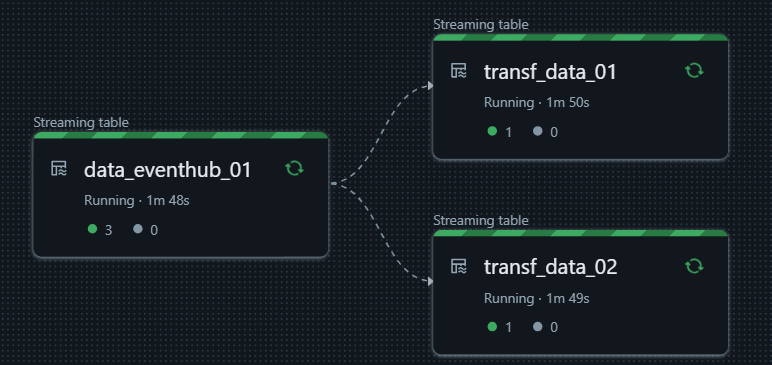
Creating tables programatically
The following code produces the same result from the previous example, but now each table that read from data_eventhub_01 table is declared programatically from a for loop.
from blipdataforge import DataPlatform
from blipdataforge.streaming.sources import EventHubSource, StreamingTableSource
from pyspark.sql.functions import col


def get_rows_by_name(df: DataFrame, name: str):
    """Get registers where `name` column is equal to `name` parameter."""
    return df.where(col("name") == name)


dp = DataPlatform()
streaming = dp.get_streaming_engine()

connection_string = dbutils.secrets.get(scope="kv-clients-dev", key="my-secret-conn-str")
schema = StructType([
    StructField("id", IntegerType(), True),
    StructField("name", StringType(), True),
    StructField("message", StringType(), True),
    StructField("date", StringType(), True)
])

table_definitions = [
    {
        "name": "transf_data_01",
        "partition_cols": ["date"],
        "transformations": [(get_rows_by_name, [], {"name": "Victor"})],
        "comment": "A streaming table with data from `table_from_envethub_01` where name is equals to 'Victor'."
    },
    {
        "name": "transf_data_02",
        "partition_cols": ["date"],
        "transformations": [(get_rows_by_name, [], {"name": "Pedro"})],
        "comment": "A streaming table with data from `table_from_envethub_01` where name is equals to 'Pedro'."
    }
]

streaming.table(
    name="data_eventhub_01",
    comment="A streaming table with data from an Azure Event Hub.",
    temporary=False,
    partition_cols=["date"],
    transformations=[],
    data_source=EventHubSource(
        topic="dataforge-test",
        namespace="eh-geral-dataplatform",
        connection_string=connection_string,
        schema=schema
    )
)

# Define tables programatically from a for loop
for definition in table_definitions:
    streaming.table(
        name=definition["name"],
        comment=definition["comment"],
        temporary=False,
        partition_cols=definition["partition_cols"],
        transformations=definition["transformations"],
        data_source=StreamingTableSource(
            name="data_eventhub_01"
        )
    )
Reading a delta table from Data Lake
The following code shows how to create a streaming table using data from a delta table located in the Data Lake. Here we read from the bliplayer.raw.messages table, filtering records from a specific date, using partition column StorageDateDayBR.
from blipdataforge import DataPlatform
from blipdataforge.streaming.sources import TableSource
from pyspark.sql.functions import col


def get_rows_by_date(df: DataFrame, date: str):
    """Get registers from a specific date."""
    return df.where(col("StorageDateDayBR") == date)


dp = DataPlatform()
streaming = dp.get_streaming_engine()

connection_string = dbutils.secrets.get(scope="kv-clients-dev", key="my-secret-conn-str")
schema = StructType([
    StructField("id", IntegerType(), True),
    StructField("name", StringType(), True),
    StructField("message", StringType(), True),
    StructField("date", StringType(), True)
])

streaming.table(
    name="data_messages_01",
    comment="A streaming table with data from a delta table in the Data Lake.",
    temporary=False,
    partition_cols=["StorageDateDayBR"],
    transformations=[(get_rows_by_date, ["2024-12-27"], {})],
    data_source=TableSource(
        catalog="bliplayer",
        database="raw",
        name="messages"
    )
)