How to ingest data from Google Sheets
On a recent release of blipdataforge, a new Facade was introduced in the library.
Which is the DataPlatform.ingest_google_sheet() function. With this function
you can now ingest data from a Google Sheet into the data lake. In other words,
you might want to use this service to bring data from an existing Google Sheet
to a live table in the Data Lake.
This service of is available both as a facade in blipdataforge, and also,
as a web page in the Gaia Portal.
How to use the thing?
First of all, in order to use this service, you have to know some basic infos, which are:
- the key that identifies this Google Sheet that you want to ingest.
- the name of the catalog where you want to save the data from the Google Sheet.
- the name of the table where you want to save the data from the Google Sheet.
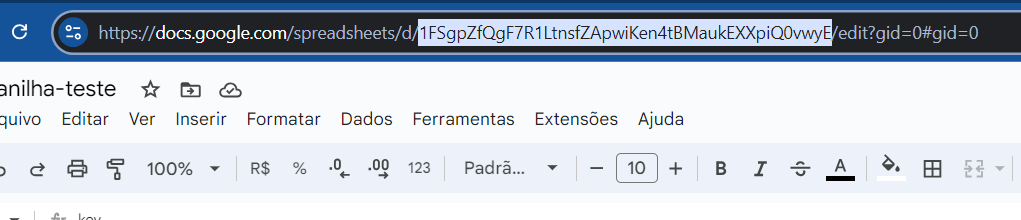
You can find the key that identifies your Google Sheet in the URL of this particular Google Sheet. Just look at the URL of this sheet in your web browser, and you will see a section in the URL that is filled with random characters. These crazy characters are the key to the sheet. This section of the URL is exposed in the image below:
Furthermore, this Google Sheet that you want to ingest, must be shared with the
following email: data-platform@datarouting-api.iam.gserviceaccount.com. If you don't
share your sheet with this email, the service cannot access your Google Sheet, and
read the data that is in this Google Sheet to ingest it. To do that, click on the
"Share" button (this button is exposed in the image below) in your Google Sheet,
and share it with the email mentioned above.

Now, supposing that you have already made this step, and, that you have gathered
the three information mentioned on the bulletpoints above, you can now call
the ingest_google_sheet() function from blipdataforge, and use it
to ingest the Google Sheet.
In the example below, we are using the function to ingest data from the
Google Sheet identified by the key "1JmVgINsyvF4QOEgZz7XsrJK6yVKRgu_bPnqv-7QCo14".
And the data from this sheet will be saved in the table referenced at
clients_trustedzone.ingest_file.sales_per_month.
from blipdataforge import DataPlatform

dp = DataPlatform()
dp.ingest_google_sheet(
    sheet_key="1JmVgINsyvF4QOEgZz7XsrJK6yVKRgu_bPnqv-7QCo14",
    catalog="clients_trustedzone",
    database="ingest_file",
    table="sales_per_month"
)
Be careful with choosing the location of the data
There are two things in the function ingest_google_sheet() that you
need to be careful about:
- the effects of overwrite mode.
- using sandbox catalogs in PRD environment, or, using trustedzone catalogs in DEV environment.
First of all, the function ingest_google_sheet() always uses an overwrite
write mode when writing the data from the Google Sheet into the data lake.
This means that, if the table referenced by the catalog and table name choosen by you,
already exists in the data lake, then, the data currently present in this table
will be overwritten by the new incoming data from the Google Sheet that you
have referenced.
Furthermore, depending on where you execute this function, you need to be careful
with the catalog choosen.
If you are not familiar with the concept of having either a sandbox or trustedzone catalog
associated with your current Databricks workspace, you should read back the section
A different catalog for each environment
of this documentation.
Having these types of catalogs in mind, if you are executing this ingest_google_sheet()
function in a PRD environment,
then, you should choose the trustedzone catalog of this environment.
For example, if you are running the function in the dbw-clients-prd-brazilsouth
Databricks workspace, then, you should use the catalog clients_trustedzone
in this function.
In contrast, if you are running the function in a DEV environment, then, you
should use the sandbox catalog of this particular environment. For example,
if you are executing the function in the dbw-clients-dev-brazilsouth
Databricks workspace instead, then, you should use the clients_sandbox catalog
to save the data from the Google Sheet.
If you try to mix the two together, i.e. write in a trustedzone catalog
from a DEV environment, or, write in a sandbox catalog from a PRD environment,
you will instantly get a ValueError exception from the ingest_google_sheet()
function.
For example, consider this example below, where I'm running this piece of
code in the Databricks workspace dbw-clients-prd-brazilsouth,
but I'm trying to save the data of the Google Sheet into the catalog
clients_sandbox. Because this catalog is not the catalog associated
with this particular workspace (dbw-clients-prd-brazilsouth)
the function returns to me a ValueError exception.
# Executing this piece of code in the Databricks workspace
# dbw-clients-prd-brazilsouth.
from blipdataforge import DataPlatform
dp = DataPlatform()
dp.ingest_google_sheet(
    sheet_key="1JmVgINsyvF4QOEgZz7XsrJK6yVKRgu_bPnqv-7QCo14",
    catalog="clients_sandbox",
    database="ingest_file",
    table="revenue"
)
Specifying the page/region of the Google Sheet
By default, the ingest_google_sheet() function always reads data from the
first sheet (or "page") of your Google Sheet. However, you might want to ingest (or read)
data from another sheet/page of the Google Sheet, or, from a very specific range/region
of the Google Sheet. You can provide a A1 notation value to the index argument,
to select the specific range/region of the Google Sheet that you want to ingest/read.
This index argument receives a string value as input, and this string value must be a
A1 notation value. This notation is written in the format <sheet-name>!<range>.
An example of <range> is A1:D45, while an example of <sheet-name>
is Sheet1.
A A1 notation value can contain both a <sheet-name>
and <range> component, or, it can also contain just one of these two components.
Therefore, all three values displayed below are valid examples of A1 notation values:
Sheet1, the function will ingest/read all the data from the sheet/page namedSheet1.Sales 2024, the function will ingest/read all the data from the sheet/page namedSales 2024.A1:G23, the function will ingest/read the data from the first sheet/page that is in the rangeA1:G23.Sheet1!A1:G23, the function will ingest/read the data that is in the rangeA1:G23inside the sheet/page namedSheet1.
For more details about the A1 notation, checkout: https://learn.microsoft.com/pt-br/office/vba/excel/concepts/cells-and-ranges/refer-to-cells-and-ranges-by-using-a1-notation. You probably know this notation from Microsoft Excel formulas.