How to run Data Quality checks with Soda
The blipdataforge library allows you to run Data Quality checks over your
Spark DataFrame (or SQL table) using the power of the Soda library.
With Data Quality checks you can be sure that you are delivering good quality data to your product/client. Also, with Data Quality checks you normally get a higher standardization of your data, and with that, you essentially face less risks and barriers in your data journey.
To run Data Quality checks with the blipdataforge library, you need:
- To write inside a string the quality checks you want to execute, using the Soda Checks Language (SodaCL);
- Define a scan definition name, which will be used as partition of the results table, and to aggregate scans of the same context;
- Run the quality checks by calling the
run_quality_checks()function of theDataPlatformclass, passing the checks string and scan definition name;
If some Data Quality check discover an issue (or inconsistency) in your data, a message will be printed
to the console. You can then inspect what went wrong by looking at these check results that are printed
to your screen. Or, you can also look into the queries column of the <domain_catalog>.blipdataforge.quality_checks_results table that is available in Databricks (through Unity Catalog),
and run the failing queries to get the records that caused the failure of the checks.
Introduction
Maintaining impeccable data quality within our Delta Lake tables is pivotal for robust analytics and informed decision-making. Guaranteeing the accuracy, completeness, and consistency of data stored in Delta Lake tables is fundamental to fortify the integrity of information, reducing the likelihood of errors and ensuring reliability for downstream analytics and applications.
In this guide, we'll dive into utilizing BlipDataForge library alongside the Soda Core library to conduct data quality checks on Delta Lake tables.
Prerequisites
Before delving into the process, ensure your Databricks Workspace have the BlipDataForge library installed using the version 1.4.0 or above by running the command !pip list | grep blipdataforge on a notebook cell and assure that blipdataforge package is listed after the command executes, as seen in the example below:
If your Databricks Workspace does not includes the BlipDataForge library, checkout the section Installation for more info on how to install the library in your workspace.
Defining and Executing Data Quality Checks
The process of asserting the data quality of a table is resumed in 2 steps: 1) Defining the checks that will be executed against a table and 2) Executing the quality checks. Both steps will be explained next.
Definig the Quality Checks
BlipDataForge uses the Soda Core library to execute the quality checks. It means that BlipDataForge accepts any quality check string that uses the Soda Core syntax.
In a brief example: to test the data quality of the blipdataforge_audit_logs table, located in the services schema, under the logs catalog. A simple SELECT on this table returns something like the following content:
| StorageDateDayBr | level | class_name | target | user | environment |
|---|---|---|---|---|---|
| 2024-04-22 | INFO | blipdataforge | dageneral_sandbox.tests.test1 | pedro.duarte@blip.ai | ENV |
| 2024-04-22 | WARN | blipdataforge | dageneral_sandbox.tests.test1 | pedro.duarte@blip.ai | ENV |
| 2024-04-22 | INFO | blipdataforge | dageneral_sandbox.tests.test1 | pedro.duarte@blip.ai | ENV |
Giving a quick exploration, we can assume that:
- The
levelcolumn has only the values "INFO" or "ERROR". - The
usercolumns has only e-mail addresses. - The
environmentcolumn has only values "DEV" or "PROD". - The
targetcolumn has string in the formatsomething.somethig_else.another_something_else. In this case, the regex(.*)\.(.*)\.(.*)should match. - The
StorageDateDayBrcontains a date in the formatyyyy-mm-dd.
So, to assert the content of each record in the table against the rules we defined above, let's define a variable with the quality checks string. This quality check string should use the Soda Checks Language (SodaCL) syntax, which is a YAML-based format. You can see also in the example below, that this quality check string SHOULD ALWAYS start with a line in the format "checks for catalog.database.table".
For our example, the quality checks string that we want, looks something like this:
checks = """
checks for logs.services.blipdataforge_audit_logs:

    - invalid_count(level) = 0:
        valid values: ['INFO', 'WARN', 'ERROR']

    - invalid_count(user) = 0:
        valid format: email

    - invalid_count(environment) = 0:
        valid values: ['DEV', 'PROD']

    - invalid_count(target) = 0:
        valid regex: (.*)\.(.*)\.(.*)

    - invalid_count(StorageDateDayBR) = 0:
        valid format: date inverse
"""
Note
For the checks in this example we used only the Validity Metrics. To see all the possibilities and details of how to build a quality checks string, please refer to the official documentation of the Soda Checks Language (SodaCL).
Now that we defined our check string, we can move forward to execute the quality checks.
Executing Quality Checks
Now that we have defined the Data Quality checks that we want to execute, we can now execute these checks over our Spark DataFrame.
First, we must define a scan_definition_name. It is used as an aggregation of
all scans of a specific context (like a product or a team) and is also used as the
partition column of the results table. So, for this example, lets define
scan_definition_name = "data_platform_checks"
assuming that the checks belong to the Data Platform team.
Warning
Do NOT define scan_definition_name with a mission's name. A mission shouldn't be owner of anything.
Now, to execute the Data Quality checks over our Spark DataFrame,
just call the run_quality_checks function of the DataPlatform class,
passing your quality checks string to the checks argument,
and also, the scan_definition_name string. Like in the example below:
from blipdataforge import DataPlatform

dp = DataPlatform()

scan_definition_name = "data_platform_checks"
checks = """
checks for logs.services.blipdataforge_audit_logs:

    - invalid_count(level) = 0:
        valid values: ['INFO', 'WARN', 'ERROR']

    - invalid_count(user) = 0:
        valid format: email

    - invalid_count(environment) = 0:
        valid values: ['DEV', 'PROD']

    - invalid_count(target) = 0:
        valid regex: (.*)\.(.*)\.(.*)

    - invalid_count(StorageDateDayBR) = 0:
        valid format: date inverse
"""

results = dp.run_quality_checks(
    checks=checks,
    scan_definition_name=scan_definition_name
)
In this example, the function run_quality_checks() is being responsible for
searching and locating the logs.services.blipdataforge_audit_logs table for you.
So, in this case, the table is already stored in the Data Lake.
However, what if you
wanted to apply the quality checks over a Spark DataFrame that is
not stored in the Delta Lake yet?
To do this, you just pass the Spark DataFrame that you want to use
to the df argument in the run_quality_checks() function.
Like in the example below:
from blipdataforge import DataPlatform
from pyspark.sql import SparkSession
from datetime import date
from pyspark.sql import Row

spark = SparkSession.builder.getOrCreate()
dp = DataPlatform()
data = [
  Row(id = 1, value = 28.3, date = date(2021,1,1)),
  Row(id = 2, value = 15.8, date = date(2021,1,1)),
  Row(id = 3, value = 20.1, date = date(2021,1,2)),
  Row(id = 4, value = 12.6, date = date(2021,1,3))
]

df = spark.createDataFrame(data)
scan_definition_name = "data_platform_checks"
checks = """
checks for clients_sandbox.soda_checks.my_dataframe:
    - invalid_count(id) = 0:
        valid max: 3
"""

results = dp.run_quality_checks(
    checks=checks,
    scan_definition_name=scan_definition_name,
    df=df
)
Take a look what happens if we run this code in a Databricks cluster:
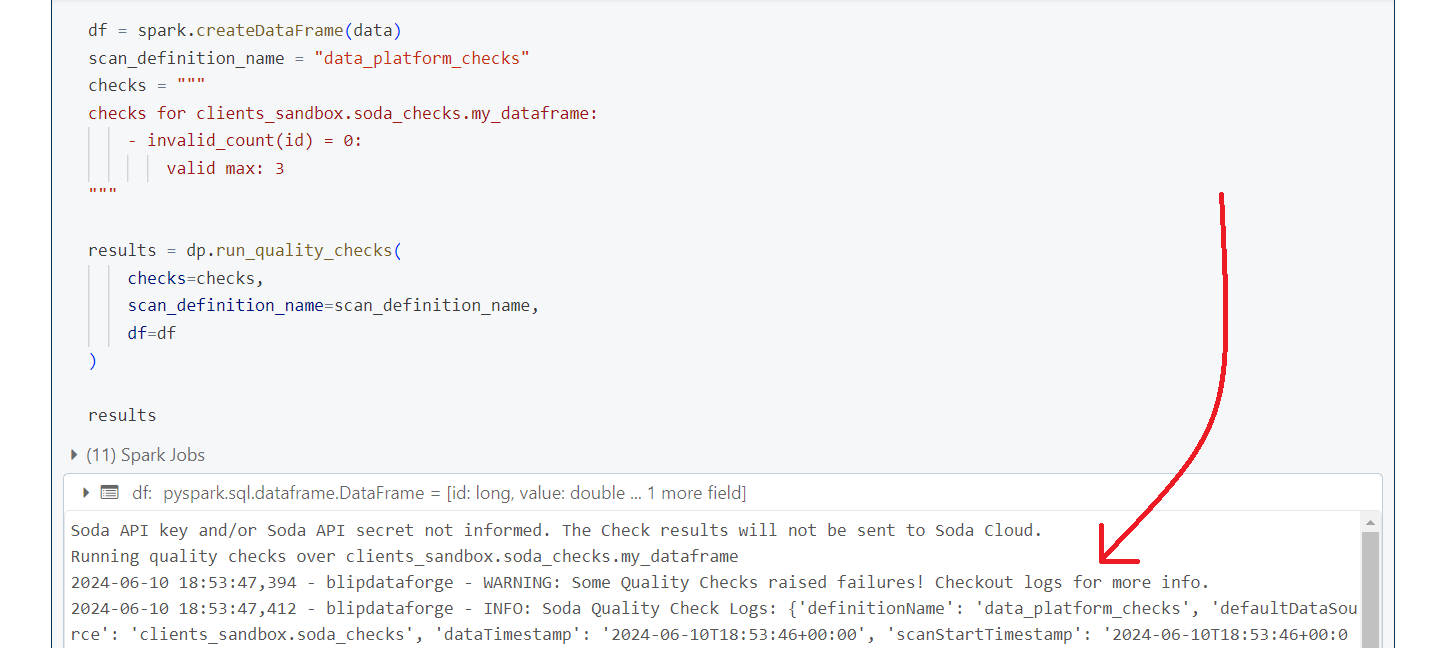
A lot of messages and output will be printed to the console, but if you look closely
at the messages, your will see a warning message among them: WARNING: Some Quality Checks raised failures! Checkout logs for more info. This message is telling you that something went wrong during the scan.
Lets see what happened.
Debugging Quality Checks
When you execute your Data Quality checks with run_quality_checks(), a dict is returned from
the function, with the results of these quality checks.
Each check result in this dict will present one of these three default states:
- PASS: the values in the dataset passed the checks you specified, i.e. these values are "correct" according to your checks;
- FAIL: the values in the dataset did not passed through the checks you specified, i.e. these values are "incorrect" according to your checks;
- ERROR: the syntax of the data quality checks that you wrote is invalid;
If we look at the logs present inside the results object that we created in the previous example,
we will find the following snippet in the dict object. You can see that the invalid_count() check
is the one that failed.
In this check, we wanted to check if there was not a single row that contained a value in
the id column that was greater than 3. But because Soda was able to find rows that
disrespected this rule, the count of rows became greater than zero. This is what produced
the failure.
  {'level': 'INFO',
   'message': '      invalid_count(id) = 0 [FAILED]',
   'timestamp': '2024-06-10T19:03:31+00:00',
   'index': 20,
   'doc': None,
   'location': None},
But despite the dict object that is returned from the function, you can also find the exact
same results in a table stored in the Data Lake. In other words, not only the function run_quality_checks()
returns a dict object with the results of the checks, but, it also makes sure to
store these results in a safe place for long term queries.
So the quality checks produced by run_quality_checks() are also persisted in the
quality_checks_results table of the blipdataforge database, under the catalog
of the current domain that you are in.
For example, if your run your Data Quality checks in the dev environment of the DAGeneral domain, so the results will be persisted in the dageneral_sandbox.blipdataforge.quality_checks_results table. But
if you run your checks in the dev environment of the clients domain instead, then, the results will be persisted in the dageneral_sandbox.blipdataforge.quality_checks_results table.
Running Automated Quality Checks
From version 1.3.7 onwards, it is possible to automatically check schema and values of columns according to the information registered on the Data Contract. These checks run when the write function is called, before writing the data in the lake. To enable this feature for your ETL jobs you need to:
- Register a Data Contract for you table using the data.blip.tools portal;
- Request the Data Platform team to register an Data Contract Authentication Token on your team's Databricks Secret Scope;
- Retrieve the token from the Secret Scope using the
dbutils.secrets.get("secret_scope_name", "key_name")function; - Set the
DATA_CONTRACT_API_TOKENenvironment variable at the beggining of your code with your auth token using theos.environfunction from theosmodule.
In other words, after executing the first two steps, add the following at the beginning of your code: